By Arjun Mehta
Feature flags are runtime controls: configuration that decides which code paths execute. Sounds simple. In practice, they enable some of the most powerful deployment strategies in software engineering.
They also accumulate like debt. Most codebases have feature flags from three years ago still controlling production behavior, nobody remembering what they do.
Feature Flags in 60 Seconds
Feature flags are conditional code blocks: if flag_enabled, execute new behavior, else execute old behavior. Use cases: safe deploys (new code deploys but doesn't execute until enabled), gradual rollouts (enable for 5% of users, measure, increase to 100%), A/B testing, kill switches (disable a feature if it breaks), and trunk-based development (commit to main with features behind flags, no branches needed). Challenges: flags add code complexity, old flags accumulate and become technical debt, flag evaluation performance matters at scale.

Why Feature Flags Matter Now
First: deployment risk reduction. You can deploy code to production that doesn't execute until you're ready. This eliminates "code sitting in staging for 3 days waiting for approvals." Code deploys fast, executes when ready.
Second: gradual rollouts. Instead of "feature launches for 100% of users at once and breaks for 100% of users," you enable for 10% first, measure metrics, catch problems, increase to 100%.
Third: kill switch. A feature is misbehaving. You don't need to deploy a new version - you disable the flag. Instant rollback.
Fourth: trunk-based development. Every feature doesn't need its own branch. Feature branches create merge conflicts and test divergence. Flags let you merge to main immediately and control visibility with flags.
The Types of Flags
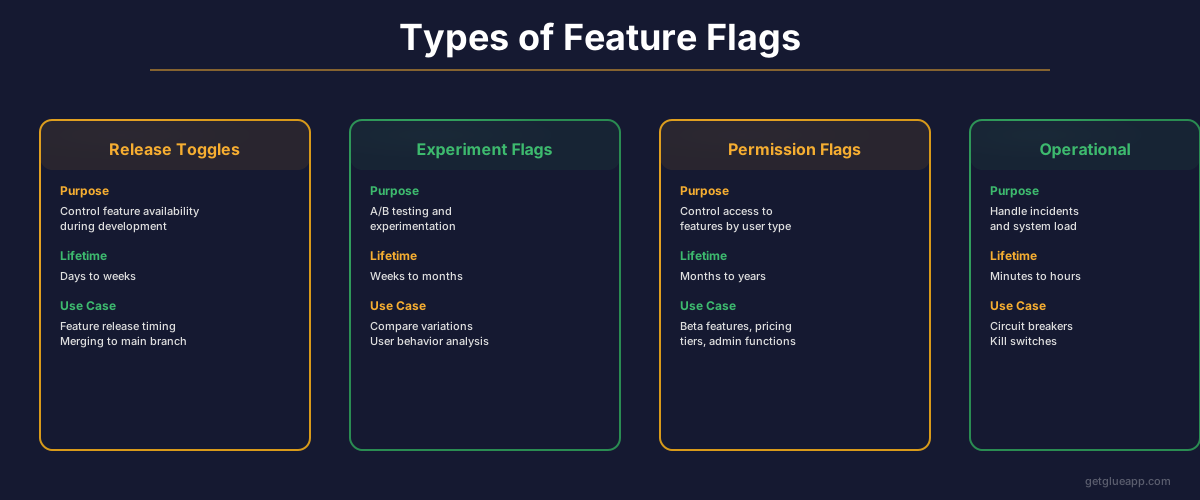
Release flags: Controls whether a feature executes. Used for safe deploys and gradual rollouts. Lifespan: days to weeks.
Experiment flags: Compares two behaviors. 50% of users see version A, 50% see version B. Used for A/B testing. Lifespan: days to weeks.
Ops flags: Controls infrastructure behavior. Circuit breaker for a broken service, cache bypass during debugging. Lifespan: seconds to hours.
Permission flags: Controls access. "Admin users see this feature, regular users don't." Can be long-lived.
The key: each type has different governance. Release flags should expire. Experiment flags should have a decision attached (did B win?). Ops flags should be manual. Permission flags are often long-lived.
The Problem: Flag Debt
Old flags accumulate. A feature launched 2 years ago, still behind a flag, flag is always enabled, but the old code path is never executed. It's dead code. But it's still in the codebase, still needs testing, still adds cognitive load.
Common scenario: a flag was supposed to be temporary. The old code path was removed (or so the engineer thinks). But the flag evaluation is still there. Years later, someone tries to turn off the flag and the application crashes because the old code path no longer exists.
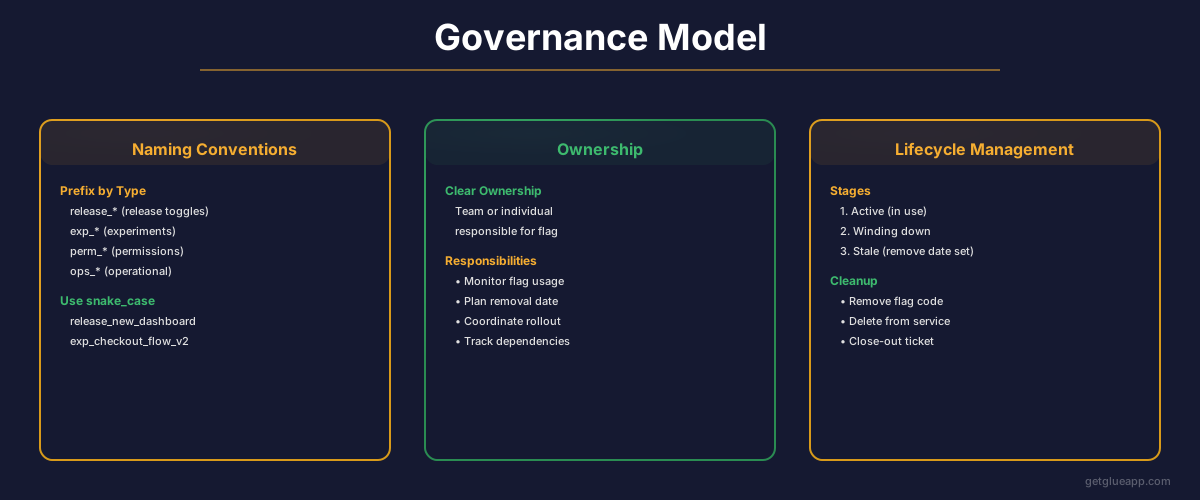
Solution: every flag has an owner, an expiry date, and a cleanup plan.
Owner: who can make decisions about the flag?
Expiry: when should this flag be evaluated and a decision made (remove it, make it permanent)?
Cleanup: if the flag is removed, what code also gets removed?
Enforce this in code review. If a flag is added without these three things, it's not ready.
The Governance Model
Flag management varies by flag type. A feature launch flag (release flag):
- Created with acceptance criteria (when do we consider the rollout successful?)
- Rolled out over days (1%, 5%, 25%, 100%)
- Monitoring metrics (error rate, latency, custom metrics)
- Decision made (rollout succeeded, roll back, investigate)
- Removed once the flag is always-on or always-off
A flag in this state is healthy. It's temporary, it has clear success criteria, it has an owner.
A flag that's been enabled for 8 months and the owner has left the company is debt.
What Good Flag Management Looks Like vs. the Graveyard
Good: flags have owners, creation dates, expiry dates. Flags created before 6 months ago are reviewed quarterly. Old flags are deleted.
Graveyard: flags from 2021 that control behavior nobody remembers. Some flags have been overridden by other flags. The old code path might not even exist anymore. New engineers ask "why is this flag here?" and get "I don't know."
The graveyard happens naturally if you don't have governance. Add governance:
- Changelog that lists flag creation and removal
- Code review requires explanation of flag purpose and expiry plan
- Quarterly review of flags over 6 months old (remove, extend, or document)
- Monitoring dashboard showing which flags are actually used (which code paths are executing)
Pitfalls
Flag evaluation performance. If you have 50 flags and each evaluation hits a database, startup takes minutes. Solve: cache flag definitions, evaluate flags locally, send batch updates from server.
Flag complexity. More flags enable more strategies but add testing burden. Test: main code path (flag off), new code path (flag on), the transition.
Flag overuse. Using flags for every feature makes deployment "safe" but never removes old code. At some point, old code paths become more liability than asset.
How Glue Helps
Glue surfaces old, unused flags. It shows: "This flag has been enabled since January 2023 but the old code path is never executed - should this flag be removed?" It also shows which code depends on which flags - helpful when deciding if a flag is safe to remove.
This dramatically accelerates flag cleanup and prevents the graveyard.
Frequently Asked Questions
Q: Should every feature launch behind a flag?
A: Most features should. Exceptions: internal tools, low-risk features, features that are launched instantly to 100% and rollback isn't needed.
Q: How do we prevent flag debt?
A: Enforce policy: every flag has an owner and expiry date. Review old flags quarterly. Remove them if they're not used.
Q: What if a flag evaluation breaks?
A: Flag evaluation should be robust. If the flag service is down, what happens? Default to old behavior (safe), or default to new behavior (optimistic)? Your choice, but decide explicitly.
Related Reading
- What Is Codebase Intelligence?
- What Is Code Intelligence?
- The Product Manager's Guide to Understanding Your Codebase
- The CTO's Guide to Product Visibility
- How to Do Competitive Analysis When You Don't Know Your Own Product
Further Resources