
Incident Management: From Alert to Resolution to Prevention
At Salesken, we had a production incident that taught me more about incident management than any process document. Our speech-to-text service started timing out, which caused the real-time coaching engine to queue up requests, which caused the event bus to fill, which caused the analytics pipeline to lag, which caused the manager dashboard to show stale data. Five systems affected. One root cause. Resolution time: 45 minutes.
The post-mortem question wasn't "why did the STT service time out?" It was "why did a timeout in one service cascade through everything downstream?"
The answer was embarrassingly simple: the coaching engine didn't have a timeout on its outbound calls. It waited forever. Everything behind it waited too. We fixed that. The next time the STT service had issues, the coaching engine timed out in 2 seconds, served a graceful fallback, and the rest of the system was fine.
A good incident management process doesn't prevent incidents. It accelerates resolution and prevents recurrence.
Incident Management in 60 Seconds
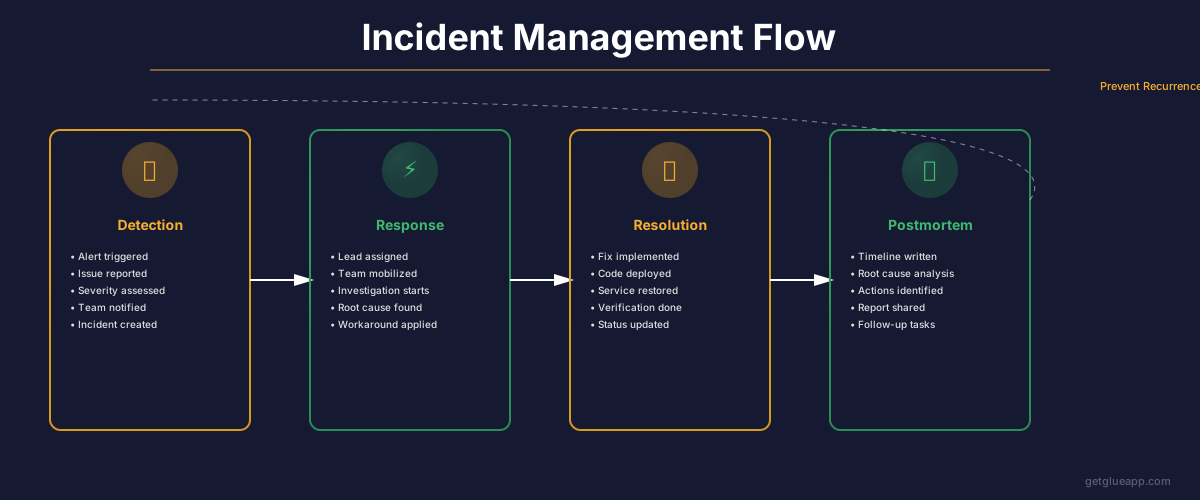
Incidents happen. Good incident management detects quickly, communicates clearly, resolves fast, and learns thoroughly. The full lifecycle: detection (alert fires), triage (how bad?), communication (who needs to know?), resolution (fix it), and post-mortem (what should change so this doesn't recur?). Most teams are decent at the first four. Post-mortems are where real learning happens, and they're the most consistently neglected part.
Why Incident Management Matters Now
The business impact of fast resolution is straightforward: less downtime, less customer impact, less revenue loss. For us at Salesken, every minute of degraded service meant sales reps on live calls getting wrong or late coaching hints. The cost wasn't abstract. Customers could feel it immediately.
How you handle incidents also shapes engineering culture profoundly. Blame-focused post-mortems create fear. Engineers start hiding issues, deploying less frequently, covering their tracks. Blameless post-mortems create psychological safety and learning. This isn't soft management theory. I've watched the same team transform from defensive and slow to proactive and fast after we shifted to blameless reviews.
Good incident management is also predictable, and predictability reduces stress. You know the on-call engineer will triage in 5 minutes, resolve or escalate within 30, and schedule a post-mortem. When the process is reliable, the people inside it are calmer.
The Incident Lifecycle
Detection: An alert fires, a customer reports a problem, or a metric exceeds a threshold. The earlier detection happens, the better. Automated alerts should catch issues before customers notice. When your customer reports an incident before your monitoring does, that's a signal your observability needs work.
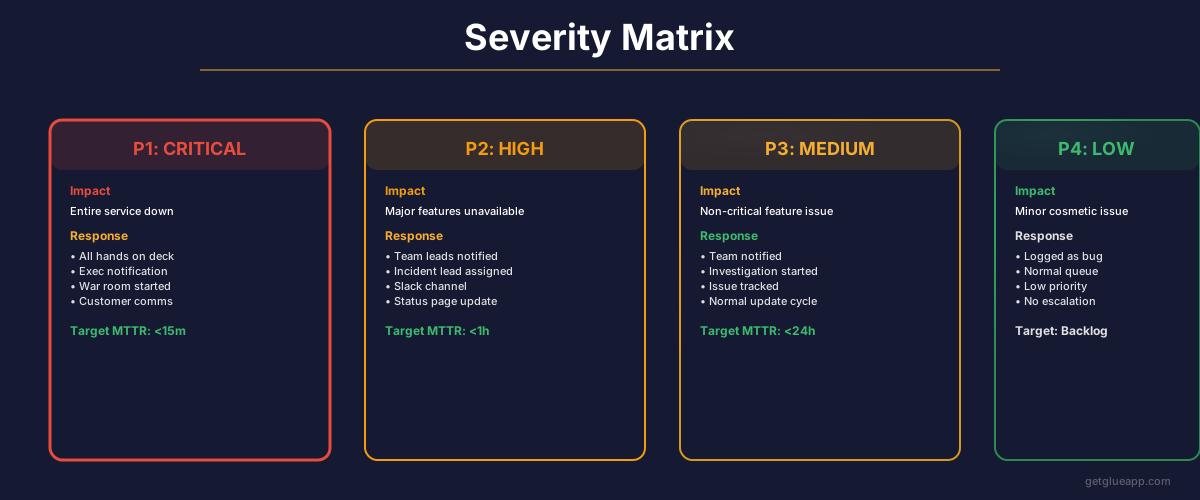
Triage: What's broken? How bad? Is it affecting production? Triage should happen in minutes, not after a discussion. Clear severity levels help: SEV1 means user-facing with no workaround (emergency). SEV2 means user-facing with a workaround. SEV3 means not user-facing. SEV4 is cosmetic. At Salesken, we wasted time early on debating severity during incidents. Once we made the definitions explicit and non-negotiable, triage dropped from 10 minutes to 2.
Communication: Everyone who might be needed gets notified. Updates every 10 minutes if it's not resolved. Status page updated if it's user-facing. One channel for incident discussion, not five. At one point we had incident updates going to Slack, email, a war room link, PagerDuty, and a Jira ticket simultaneously. Nobody knew where to look. We consolidated to one Slack channel per incident with a bot posting to everything else. Much better.
Resolution: Root cause found, fix applied, verified that it's actually fixed. Don't declare victory until you've confirmed the fix in production with real traffic.
Post-mortem: Scheduled within 48 hours while it's fresh. Later is worse than never, but sooner is far better.
What Makes Incident Response Fast
Clear severity levels where everyone knows what SEV1 means. No ambiguity, no debate during the incident.
On-call rotations that don't burn people out. Two-week rotations are fine. 24/7 on-call that's also your regular day job is not sustainable. At Salesken, we initially had our most senior engineers permanently on-call because "they know the system best." That burned them out within months. We moved to a rotation, invested in runbooks so junior engineers could handle common issues, and senior engineers slept better. The resolution times were actually comparable because the runbooks were good.
Runbooks that are actually tested. A runbook saying "if service X fails, follow these steps" is only useful if those steps actually work. Untested runbooks are worse than no runbooks: you follow them, they don't work, now you're panicking and distracted. Test your runbooks quarterly by simulating the failure scenario.
Escalation paths that prevent spinning. If the on-call engineer can't resolve within 30 minutes, escalate. Don't let one person struggle for 2 hours. This was a hard cultural shift for us. Engineers felt like escalating was admitting failure. We had to reframe it: escalating is the fastest path to resolution, not a sign of weakness.
The Post-Mortem: The Most Valuable and Most Neglected Part
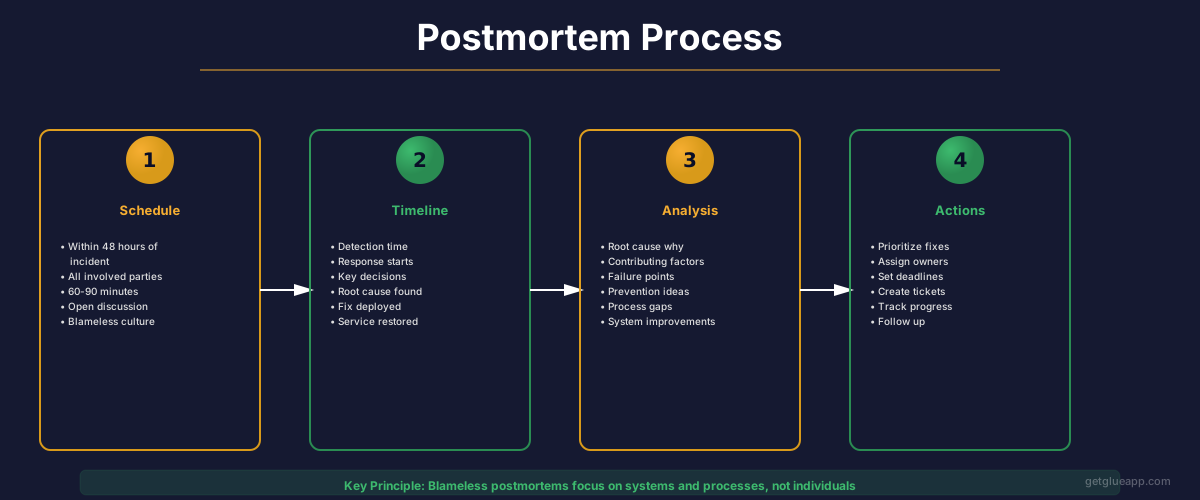
A post-mortem has one job: identify what should change to prevent recurrence. Not blame anyone. Not even necessarily find the single root cause (though that helps). The job is prevention.
Most post-mortems stop at "root cause." Ours was "STT service timeout." That's not actionable. Why did the timeout cause cascading failures? "Because downstream services don't have timeouts." Now it's actionable. Keep asking why until you reach something you can fix structurally.
A good post-mortem answers four questions:
What made this hard to detect? Our alert threshold was too high. We detected 15 minutes after customers noticed. Or: our monitoring didn't cover this failure mode at all.
What made it hard to diagnose? No logs showing that the coaching engine was waiting on the STT service. We had to guess based on timing correlations.
What made it hard to resolve? Rollback required running database migrations in reverse. Took 10 minutes just to execute the rollback plan.
What structural change prevents recurrence? Add timeouts to downstream services. Lower alert thresholds. Add tracing between services. Simplify the rollback process.
Most post-mortems answer the first three. The fourth question is where actual prevention happens. If your post-mortem doesn't produce at least one structural change, it was a storytelling exercise.
I got post-mortems wrong for the first year at Salesken. We held them, wrote them up, filed them in Confluence. And then nothing changed. The action items sat in a backlog that nobody prioritized. It took a repeat incident (same root cause, same cascade, same 40-minute resolution) to realize that a post-mortem without follow-through is just documentation theater. After that, we started tracking post-mortem action items separately from the feature backlog, with their own SLA: addressed within two sprints or escalated.
How to Run a Blameless Post-Mortem
Assume everyone acted with good intent, given the information they had at the time. The engineer who deployed the code thought it was safe. It wasn't. That's not failure. That's the human condition. The goal is building systems that catch these problems before they reach production, or contain them when they do.
Focus on systemic issues. "The engineer didn't notice the alert" is a person problem. "The alert was too low-priority and was buried in notification noise" is a system problem. Fix the system. The system is what you can change durably. People rotate, change roles, leave. The system stays.
Involve everyone: the engineer who fixed it, the on-call manager, engineers from dependent services. Diverse perspectives catch system issues that any single person would miss.
Document and share the post-mortem broadly. Lessons hoarded by one team get re-learned painfully by another team six months later.
Common Incident Patterns and What They Reveal
Cascading failures: One service fails, takes down everything downstream. Reveals: lack of timeouts, lack of circuit breakers, tight coupling. This was our biggest pattern at Salesken.
Database bottlenecks: Queries slow down, service times out, downtime follows. Reveals: no data retention policy, no query performance testing, missing indices, or table locks during migrations.
Config errors: A change to a config file breaks the system. Reveals: config changes aren't tested, no gradual rollout for config changes, no fast revert mechanism. We had a config incident at Salesken where someone changed a feature flag default in the wrong environment file. Staging config deployed to production. Caught in 4 minutes because our monitoring flagged the behavior change, but it shouldn't have been possible in the first place.
Resource exhaustion: Memory or CPU fills up, service crashes. Reveals: no resource limits, no autoscaling, no alerting on resource usage trends (you want to alert on the trend, not the cliff).
Connecting Incidents to Codebase Intelligence
When incident response starts, the first question is usually "what changed?" Codebase intelligence accelerates that by showing which code changed recently, which services are affected, what the dependencies are, and who owns the affected code. Instead of grepping through git log, you see the relevant changes immediately.
At Glue, we're building this connection between incident signals and code changes. The part that works well: identifying recent code changes that correlate with the incident timeline. The part that's still hard: distinguishing between code changes that caused the incident and code changes that merely happened to deploy around the same time. Correlation isn't causation, and we're honest about that gap.
For post-mortems, codebase intelligence adds another layer: "What made this hard to diagnose?" becomes answerable by looking at whether the code change that caused the incident was visible in monitoring. If a service changed but no metrics changed, that's both a finding and a preventive action.
Frequently Asked Questions
Q: How much monitoring is too much?
Monitor what matters: user impact (latency, errors, throughput), system health (CPU, memory, disk), and business metrics (revenue, feature usage). Monitoring every internal metric creates noise that drowns out real signals. If your on-call engineer has alert fatigue, you have too many alerts, not too much monitoring.
Q: Should post-mortems be mandatory?
Yes, for any incident that affects customers or is SEV1/2. Minor incidents might not need a formal post-mortem, but a brief writeup of what happened and what changed is still valuable. The habit matters more than the format.
Q: How often should we do incident response drills?
Quarterly at minimum. Simulate an incident, run the response process, see what breaks. Most teams skip drills and then are surprised during a real incident by what doesn't work. At Salesken, our first drill revealed that our runbook referenced a Slack channel that had been archived three months earlier. Better to find that in a drill than at 3 AM.
Related Reading
- Mean Time to Recovery: The Complete Guide to Faster Incident Resolution
- Observability: Beyond Monitoring
- Deployment Frequency: The DORA Metric That Reveals Your True Engineering Velocity
- Feature Flags: The Complete Guide to Safe, Fast Feature Releases
- Change Failure Rate: The DORA Metric That Reveals Your Software Quality
- AI Incident Management: From Alert to Resolution Without the War Room