
Technical Documentation: Complete Guide for Software Teams (2026)
At Salesken, our documentation was scattered across Confluence, Google Docs, README files, and Slack pinned messages. Finding anything took longer than writing it from scratch.
Your team ships code constantly. Your developers leave after three years. Your product changes every sprint. And yet somehow, someone still needs to understand why your system works the way it does. That's what technical documentation does - it captures the collective knowledge that keeps your product running.
Without it, you're stuck with tribal knowledge. With it, you cut onboarding time by 40%, reduce support tickets by 30%, and give your engineering team the context they need to move fast without breaking things.
This guide covers what technical documentation actually is, why it matters for software teams, how to write it that people will actually use, and how intelligence-driven approaches help you keep it current.
What is Technical Documentation?
Technical documentation is the complete set of written materials that explains how software systems work, how to use them, how to maintain them, and how to build on top of them. It includes everything from API specifications and architecture diagrams to runbooks, deployment guides, and inline code comments.
The key word is "technical" - it's written for technical audiences (developers, DevOps engineers, technical architects, CTOs) rather than end users. It uses technical language and assumes knowledge of software concepts.
Technical documentation serves a specific purpose: it reduces the gap between how complex your system is and how easily new people (or you, six months later) can understand and modify it.
Core Types of Technical Documentation
Every software team uses multiple types of documentation. Understanding each type helps you know what to write and when.
Architecture and Design Documents explain the big picture. They answer questions like: How does this system work at a high level? What are the key components? How do they communicate? These documents live at the intersection of design and implementation - they explain decisions made during architecture reviews and provide context for anyone joining the team.
API Documentation describes how to integrate with your system. It includes endpoint definitions, request/response formats, error codes, authentication requirements, and code examples. Good API docs reduce integration time by 60% and cut down on support questions from partners or internal teams.
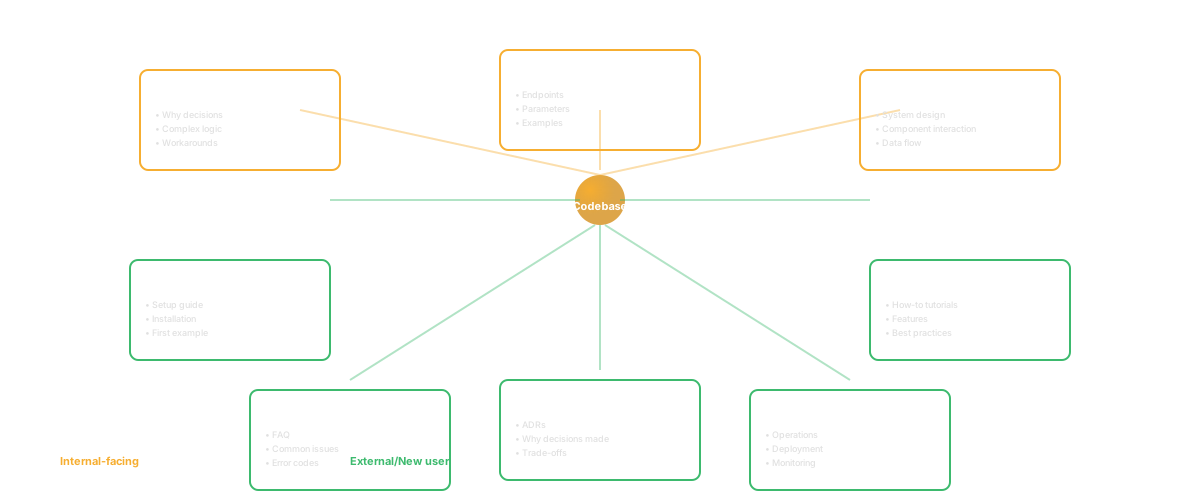
Runbooks are step-by-step procedures for specific operations. "How do I roll back a deploy?" "What do I do if database replication stops?" "How do we handle a DDoS?" These are operational documentation - they exist so your team can respond quickly under pressure without having to figure things out from scratch.
Development Guides explain how to set up a local environment, how to run tests, how to contribute code, and where the source of truth is for different system components. They're what new developers read on their first day.
Architecture Decision Records (ADRs) document the reasoning behind major technical choices. Why did we choose Postgres over MongoDB? Why did we build this service instead of using an off-the-shelf solution? These records prevent teams from rethinking the same decisions repeatedly.
Deployment Documentation covers how code gets from a developer's laptop to production. It includes build procedures, testing requirements, release checklists, and rollback procedures. It's typically more procedural than conceptual.
Code Comments are the most granular form of technical documentation. They explain the "why" behind complex logic, document non-obvious behavior, and clarify intent when code alone doesn't make things clear. Not every line needs a comment, but every surprising piece of code does.
Why Technical Documentation Matters for Software Teams
The business case for technical documentation isn't subtle. Teams with strong documentation practices see measurable improvements across multiple dimensions.
Onboarding Speed is the most obvious benefit. A developer with good documentation is productive on day one. They don't spend a week asking questions or reading through uncommented code. here's what I've seen: engineering organizations show that strong documentation reduces time-to-first-commit by 60% and time-to-productivity by 40%. For a team of 10 engineers, that's the equivalent of an extra 4-6 engineer-weeks of productivity per year from onboarding alone.
Incident Response Time drops dramatically when runbooks exist. When your database is down and your team has a documented playbook for that specific scenario, you recover in 15 minutes instead of 90. A software team responding to 10 major incidents per year with 5 engineers will spend 50 hours less on firefighting with solid runbooks. That's a full week of engineering time per engineer, annually.
Code Quality Improves when architecture decisions are documented. Developers don't make inconsistent choices when they understand the reasoning behind existing patterns. Code reviews take less time. New features follow established patterns. Technical debt accumulates more slowly.
Knowledge Retention matters more than people realize. When your most experienced engineer leaves, what goes with them? If critical knowledge exists only in their head, you've lost a piece of your system's understanding. Documentation captures that knowledge. It survives departures. It outlasts people.
Product Velocity stays high through staff transitions because new people don't have to reverse-engineer the system. Documentation provides the map. Your team doesn't slow down when someone new joins or someone experienced leaves.
The cost of not doing this is straightforward: increased onboarding time, slower incident response, more bugs that could have been prevented, and lost knowledge when people leave. The cost of doing it well is an investment that compounds over years.
Technical Documentation vs Other Documentation Types
Technical documentation is one piece of your documentation ecosystem. Understanding the distinctions prevents confusion and helps you allocate effort correctly.
Technical documentation is written for engineers building or maintaining your system. It assumes programming knowledge and uses technical terminology. Examples: architecture documents, API specifications, deployment guides, code comments.
User documentation is written for people using your product to accomplish business goals. It might be an end-user of your SaaS product, or an engineer using your SDK. The difference is intent: they're trying to accomplish something specific with your product, not understand how your system works internally. Examples: user guides, tutorials, knowledge base articles, help centers.
API documentation exists in a middle ground. It's written for engineers, but specifically for engineers who are external to your team. They want to integrate with your system, not modify it. API documentation needs examples, detailed specifications, and clear error handling. It's more polished than internal documentation but less detailed than architecture documents.
Process documentation covers organizational procedures, not technical systems. Examples: hiring processes, code review guidelines, communication protocols, meeting cadences. These documents exist for operational reasons but aren't strictly technical.
The confusion often happens because these types overlap. A deployment guide might be internal technical documentation for your team, but if you're selling a managed service, it becomes user documentation for customers. An API specification is technical documentation by nature, but it serves as user documentation for engineers integrating your API.
The practical implication: understand your audience first. That determines the type, depth, and audience level of documentation you need.
What Makes Technical Documentation Good vs Bad
Bad technical documentation is everywhere. It's out of date. It doesn't match the actual system. It's written so technically that it assumes knowledge people don't have. It's incomplete. It answers questions nobody asked and misses the ones people actually have.
Good technical documentation has three characteristics: accuracy, completeness, and clarity.
Accuracy means the documentation describes the actual system, not what the system was supposed to do or what the author wished it did. Out-of-date documentation is worse than no documentation - it sends people in the wrong direction. A developer following a deployment guide that doesn't match the current process will fail and then distrust all documentation.
Bad: "Deploy by running ./deploy.sh in the root directory." (This script was deleted in v2.3 but the docs were never updated.)
Good: "Deploy by running npm run deploy -- --environment=production. This builds the current version, runs smoke tests against staging, and promotes the artifacts to the production repository."
Completeness means you've answered the questions someone would actually have. It doesn't mean documenting every feature or every configuration option. It means covering the path from "I need to do X" to "I've done X successfully."
Bad: "API authentication uses JWT tokens. See JWT docs for more."
Good: "API calls require a JWT token in the Authorization header as a Bearer token. Generate tokens by calling the /auth/token endpoint with your API key and secret. Tokens expire after 24 hours. Include the token in every request: Authorization: Bearer <token>. When a token expires, you'll receive a 401 response; generate a new token and retry."
Clarity means someone unfamiliar with your system can read the documentation and understand it without getting lost or confused. Clear documentation doesn't skip steps. It doesn't assume knowledge. It uses concrete examples.
Bad: "Build locally with the standard process."
Good: "From the root directory, run npm install to install dependencies, then npm run build:dev to build locally. The build process bundles your code and runs it through webpack. Built artifacts go to ./dist/. To verify the build, run npm run test:build."
The gap between bad and good documentation is usually effort, not skill. It's taking an extra 30 minutes to add the concrete example. It's testing the instructions to make sure they actually work. It's keeping a checklist of what needs updating when the system changes.
How to Write Technical Documentation (Step-by-Step)
Writing good technical documentation follows a process. You don't need a special tool or a technical writing degree - you need to be systematic.
Step 1: Define Your Audience and Goal
Before writing anything, answer: Who is reading this? What do they need to accomplish?
For a deployment runbook: Your audience is an on-call engineer at 2am during an incident. Their goal is to deploy a hotfix as quickly as possible without breaking production. Your documentation should be procedural, specific, and assume they're under stress.
For an architecture document: Your audience is a new engineer joining the team or an existing engineer working on a related system. Their goal is understanding design decisions and system structure. Your documentation should explain the "why" behind decisions, not just the "what."
Different audiences need different documentation. Don't write one document that tries to serve everyone - write targeted documents for specific audiences and goals.
Step 2: Outline the Content
What questions will your audience have? List them in order. What do they need to know first?
For a "getting started" guide: Environment setup (they need this before anything else), running the test suite (they need to verify setup worked), making a small change (they need to understand the workflow), submitting a pull request (how does code get reviewed).
Don't try to be comprehensive. You don't need to cover every possible thing. Cover the path from zero to "I've accomplished the goal."
Step 3: Write With Concrete Examples
Every concept should have an example. Not pseudocode - actual code. Not "something like this" - the actual command, request, or configuration they'll use.
When you write "run the build script," instead write: "Run npm run build from the project root. This bundles your code with webpack and outputs artifacts to ./dist/."
Examples are how people actually learn. They're also how you test whether your documentation works - if you can't write an example, you haven't explained something clearly enough.
Step 4: Test Your Documentation
Give your documentation to someone who doesn't know the system. Have them follow it. Watch what confuses them. Where do they get stuck? What assumptions did you make that they didn't share?
Testing catches gaps. It catches steps you skipped because they were obvious to you (but not to the reader). It catches outdated information and incorrect examples.
The best documentation gets tested by real people before it's published.
Step 5: Make It Findable
Documentation only helps if people can find it. Store it somewhere predictable. Link to it from related documentation. Add it to your team wiki or documentation site.
If your deployment guide is hard to find when you're in an incident, people won't use it. If your API documentation isn't in the obvious place, integrators will ask you questions instead of reading the docs.
Make finding documentation easier than asking a teammate.
Step 6: Plan for Updates
Documentation decays. Systems change. Code paths shift. Old examples break.
Pick a schedule for review. Every six months, have the person responsible for each system review its documentation. Is it accurate? Are the examples still valid? Update what's wrong.
Mark documentation with last-reviewed dates. When documentation is four months old, it's fine. When it's two years old, people trust it less.
Technical Documentation Templates and Formats
Templates reduce the barrier to writing documentation. They provide structure. They ensure consistency. They make people stop and think about what needs to be documented.
Architecture Decision Record (ADR) Template
Status: Accepted | Proposed | Deprecated Context: What problem are we trying to solve? Decision: What did we decide to do? Consequences: What are the tradeoffs? What becomes easier? What becomes harder? Alternatives Considered: What else could we have done?
Example: "We decided to use PostgreSQL instead of MongoDB because our data model requires strong consistency and we need ACID transactions. The tradeoff is less flexibility for unstructured data, but consistency and transaction support outweigh that for our use case."
API Documentation Template
Endpoint: GET /api/v1/users/{id} Description: Retrieve a single user by ID Authentication: Bearer token required Parameters: id (path, integer, required) - The user ID Response: 200 OK with user object Errors: 404 if user not found, 401 if unauthenticated Examples: [Include curl example and code example]
Runbook Template
Title: How to Roll Back a Production Deploy Prerequisites: Access to the deployment system, knowledge of the current version number Steps:
- Verify the current version is broken: [specific command]
- Identify the previous stable version: [where to check]
- Trigger a rollback: [specific command]
- Verify the rollback succeeded: [how to confirm] Rollback time: Typically 3-5 minutes If something goes wrong: [escalation path]
Development Setup Guide Template
System Requirements: [OS, Node version, etc.] Clone the Repository: [git command] Install Dependencies: [npm/yarn/etc.] Configuration: [environment variables, config files] Run Tests: [verify everything works] Start Development Server: [local dev server command] Making Your First Change: [step-by-step of a small change] Submitting Code: [pull request process]
Templates make writing documentation faster and more consistent. Use them.
The Staleness Problem and How to Solve It
Documentation's biggest enemy is staleness. Systems change. Code paths shift. Configuration options disappear. People follow old instructions and hit errors. Then they stop trusting documentation.
Staleness happens because documentation lives separately from code. You change code. You forget to update documentation. Three months later, documentation is wrong.
The solution isn't better intentions. It's building the update process into your workflow.
Link Documentation to Code Changes
When someone changes code that affects documented behavior, update the documentation in the same pull request. Make documentation changes part of the review process. "Looks good, but did you update the docs?"
Some teams use PR templates that include a checklist: "Documentation updated for this change." It's a small friction point that catches a lot of staleness.
Assign Documentation Ownership
One person per system should be responsible for that system's documentation. Not the person who wrote it - someone who owns it. When a system changes, the owner updates the docs. It's an explicit responsibility, not something that happens if people remember.
Automate Documentation Updates Where Possible
API documentation can be auto-generated from code. Architecture diagrams can be auto-generated from infrastructure-as-code. Changelog generation can be automated from git commits. You're not eliminating all manual effort, but you're catching a category of staleness automatically.
Mark Documentation with Review Dates
"Last reviewed: January 2026." When someone reads documentation that's three months old, they have more confidence than reading documentation that's two years old. It signals that someone recent has verified it works.
Run a documentation review once per quarter. Spend 30 minutes per system. Verify examples still work. Check that major behavior changes are documented. Update the review date. It's not a big time investment and it prevents slow decay.
AI-Powered Documentation in 2026
Documentation in 2026 increasingly involves AI. Not because documentation is becoming less important - it's becoming more important - but because AI changes how documentation gets created and maintained.
AI-Generated API Documentation can be created directly from code annotations. You add JSDoc comments to your API endpoint. An AI tool generates comprehensive API documentation including examples, error scenarios, and authentication details. You review it. It's right the first time 70% of the time, saving hours of manual writing.
AI-Powered Documentation Freshness tools scan your code and compare it against your documentation. They flag when code changes don't match documentation. They generate suggested updates. The human reviews and approves. Staleness becomes a decision (we chose not to document this change) rather than an accident.
AI-Assisted Onboarding uses documentation to help new developers. A new engineer can ask questions: "Why does this service handle its own caching instead of using Redis?" The AI searches your architecture documents for ADRs mentioning that decision and returns the reasoning. Onboarding accelerates because people find answers in existing documentation rather than asking teammates.
AI-Generated Examples creates code examples in multiple languages from a single source. One API example generates automatically in Python, JavaScript, Go, and Java. Language-specific documentation syncs automatically.
AI Documentation Search works better than text search. A developer can ask a natural language question: "How do I deploy a hotfix?" The system understands context and returns the relevant runbook, even if the runbook doesn't use the word "hotfix."
These tools don't replace good documentation. They depend on it. But they make good documentation easier to maintain and more useful once it exists.
Tools for Technical Documentation
Your tool choice affects what gets documented and how. Some tools make documentation frictionless. Others create barriers.
Confluence is the standard for internal technical documentation. It's searchable. It supports rich formatting. Teams like it because it integrates with Jira and feels familiar. The downside: it often becomes a dumping ground where documentation gets lost.
GitHub-based documentation (READMEs, wikis, code comments) keeps documentation close to code. Changes to code and documentation happen in the same PR. This reduces staleness. The downside: it's less discoverable than a centralized documentation site.
Document360 and similar knowledge base tools are good for customer-facing technical documentation. They're SEO-friendly. They support versioning. They integrate with analytics to show which docs people use most. They're less good for internal-only documentation.
OpenAPI/Swagger is the standard for API documentation. You define your API schema once. Documentation, client SDKs, and tests all generate from it. This reduces staleness by definition - your docs can't be wrong if they're generated from the source of truth.
Architecture documentation tools like Structurizr let you define system architecture in code, then generate diagrams and documentation. This keeps diagrams current with reality.
Generated documentation from source code comments (JSDoc, Javadoc, Sphinx) automatically extracts documentation from code. The friction of keeping it up to date drops dramatically.
The pattern: pick tools that tighten the feedback loop between code and documentation. The closer they're linked, the fresher documentation stays.
How Codebase Intelligence Changes the Game
Most teams treat documentation as a separate project from code. Write the code. Write docs about it. Hope they stay in sync.
Codebase intelligence is different. It creates a live connection between your code and your documentation. Your system's actual behavior becomes the source of truth, and documentation derives from it.
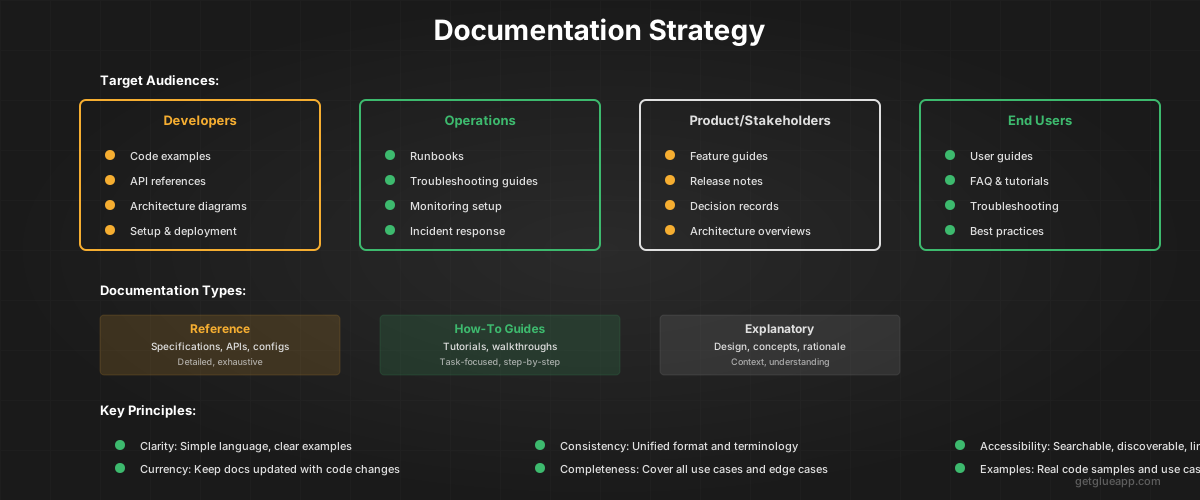
Here's what this looks like in practice:
An engineer joins your team. Instead of spending their first day reading outdated documentation, they use codebase intelligence to ask questions about the system. "What service handles user authentication?" The system shows the authentication service, its recent changes, the primary maintainers, and the architecture decision explaining why it's structured this way.
They see who wrote recent changes. They see test coverage. They understand dependencies. The documentation they need - the actual system structure - is visible in real-time, not frozen in an old markdown file.
When you need to update documentation because code changed, codebase intelligence catches the divergence immediately. Your documentation shows the old parameter name. Your code uses a new one. The mismatch surfaces. The person responsible for documentation gets notified. They update it within hours, not months.
When you evaluate whether to use a third-party service or build it yourself, you want to understand your current architecture. Codebase intelligence makes that transparent. You see every integration point. You understand every dependency. You can make decisions grounded in what you actually have, not what documentation claims you have.
When onboarding a new engineer, you point them to your codebase. "This is what we built. These are the key services. These are the APIs between them. Read the code." Codebase intelligence provides the scaffolding. It highlights important functions and services. It explains recent changes. It answers the "why" by connecting code to decision records.
The outcome: your team works faster. You onboard new engineers 40% faster. Incidents get resolved faster because your team understands the system deeply. Code reviews are more thoughtful because context is always available. Documentation quality improves because there's friction when it diverges from reality.
FAQ
What do you mean by technical documentation?
Technical documentation is written material that explains how a technical system works, typically for technical audiences like developers or architects. It includes API specifications, architecture documents, runbooks, deployment guides, and code comments. Unlike user documentation (which explains how to use a product), technical documentation explains how a product was built and how to modify it.
What is an example of good technical documentation?
Good technical documentation includes concrete examples, is kept current with the system it describes, and answers specific questions a technical audience would have. For example, a deployment guide might document: "Run npm run deploy -- --env=production from the project root. This bundles your code, runs smoke tests against staging, and uploads artifacts to production. Deployments typically take 3 minutes. If deployment fails, the system automatically rolls back to the previous version." That's good because it's specific, testable, and answers the main questions an engineer would have.
What are the main types of technical documentation?
The main types are: Architecture documents (system design and structure), API documentation (integration specifications), Runbooks (operational procedures), Development guides (how to contribute), ADRs (decision rationale), Deployment documentation (release procedures), and Code comments (inline explanations). Most teams maintain multiple types for different audiences and purposes.
How often should technical documentation be updated?
Documentation should be reviewed and updated whenever the system changes significantly. In practice, teams should establish a formal review process: quarterly deep reviews where someone checks every document against current reality, plus informal updates whenever code changes that affect documented behavior. Mark documentation with last-reviewed dates so readers can gauge its freshness.
How can you ensure technical documentation stays current?
Make documentation updates part of your code review process. Require documentation changes when code changes that affect documented behavior. Assign ownership - one person responsible for each system's documentation. Use tools that tie documentation to code (GitHub READMEs, API schema-based documentation). Run quarterly documentation reviews. Test documentation by having someone new follow it and give feedback.
Related Reading
- Knowledge Management System Software for Engineering Teams
- Software Architecture Documentation: A Practical Guide
- Conway's Law: Why Your Architecture Mirrors Your Org Chart
- Developer Onboarding Metrics: How to Measure and Accelerate Time-to-Productivity
- Code Dependencies: The Complete Guide
- What Is a Technical Lead? More Than Just the Best Coder
- What Is Codebase Documentation?