
C4 Architecture Diagram: How to Model Software Systems That Teams Actually Understand
Most software architecture diagrams fail the same way. They try to show everything at once: boxes for services, arrows for calls, annotations for technologies, color coding for teams, dotted lines for async flows. The result looks comprehensive in a review and is unreadable in practice. Two senior engineers staring at it will disagree about what it means.
I've drawn hundreds of these diagrams across three companies. At Salesken, our "definitive" architecture diagram had 40+ services, 200+ arrows, and was printed on an A1 poster in the office. Nobody used it. It was wall art. The useful architecture knowledge lived in the heads of three senior engineers.
Simon Brown's C4 model solves this by acknowledging an obvious truth: different audiences need different levels of abstraction. A CTO doesn't need to see every microservice. A new engineer doesn't need to see the whole system before understanding their first service. C4 provides four levels — Context, Container, Component, and Code — each designed for a specific audience and a specific question.
The Four Levels
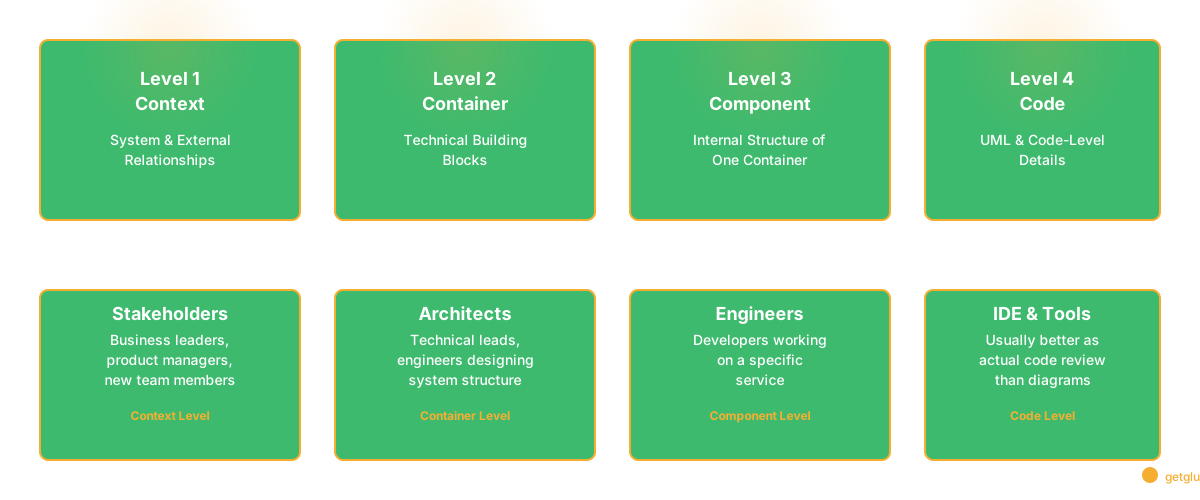
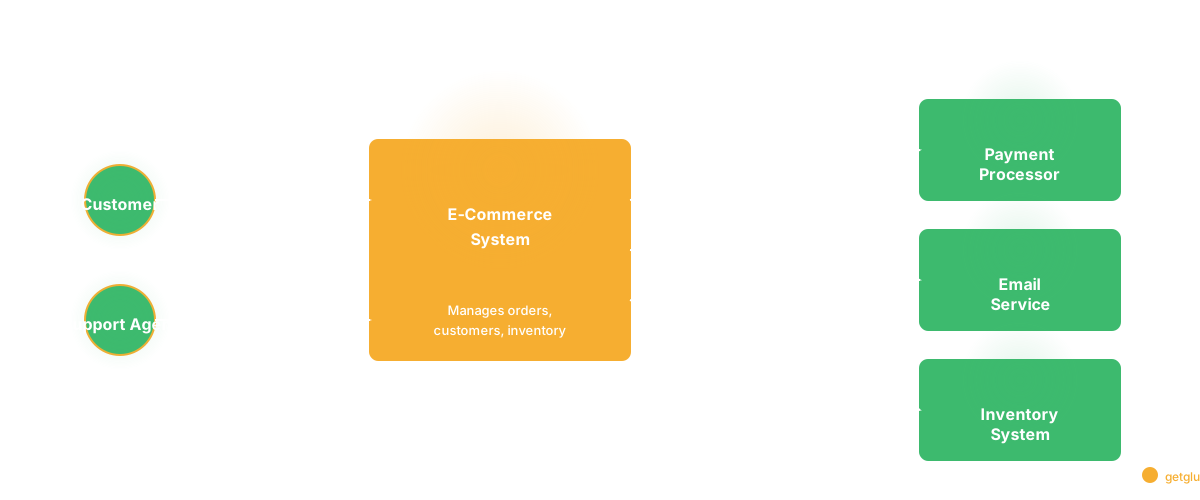
Level 1: System Context. The highest abstraction. Shows your software system as a single box surrounded by users and external systems. This is the "what is this thing and who uses it" diagram. Audience: business stakeholders, anyone new to the project.
At Salesken, our Level 1 showed: sales reps (users), managers (users), the Salesken platform (our system), and external connections to telephony providers, CRM systems, and the STT service. Nothing about how any of these worked internally. Just: what is it, who uses it, what does it depend on. A new PM could understand it in 30 seconds.
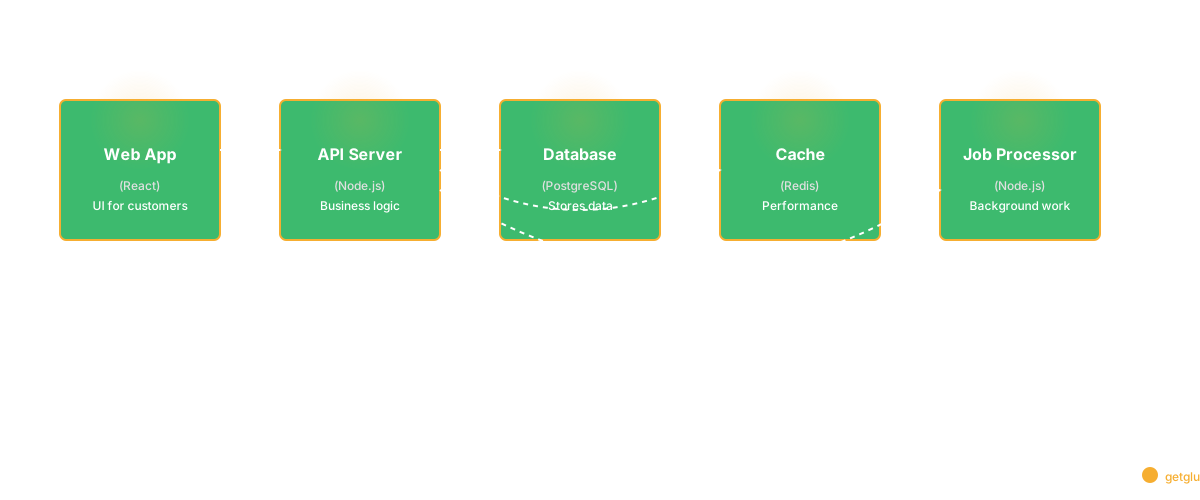
Level 2: Container. Zooms into the system to show major technical building blocks — applications, databases, microservices, message queues. Each container is a separately deployable unit. Audience: tech leads, architects, anyone who needs the system's overall shape.
This is where most of the practical value lives. At Salesken, our Level 2 showed: the React dashboard, the Node API gateway, the coaching engine, the analytics pipeline, the event bus (Kafka), PostgreSQL, Redis. Stable enough to remain accurate for months. Specific enough to inform engineering decisions.
Level 3: Component. Zooms into a single container to show internal structure — major logical components and how they interact. Audience: engineers working on that specific service. At Salesken, we only maintained Level 3 diagrams for our coaching engine (the most complex service) and the payment integration (the most critical). Everything else, Level 2 plus reading the code was sufficient.
Level 4: Code. UML class diagrams, ER diagrams. Brown himself has noted this level is often not worth maintaining. Code changes too frequently. For most teams, reading the code directly is better than maintaining code-level diagrams.
Why C4 Works
The fundamental insight is that architectural communication failures aren't about diagramming skill. They're about scope mismatch.
At UshaOm, where I led 27 engineers building an e-commerce platform, I watched a developer create an architecture diagram for a meeting with our investors. He put in every microservice, every database table relationship, every message queue. The investors' eyes glazed over in 30 seconds. What they needed was Level 1: "you're building an e-commerce platform, customers order through the website, orders go to the warehouse system, payments go through Razorpay." That's it. Ten boxes. Five arrows. Total clarity.
The next week, a new engineer needed to understand how product search worked. The investor diagram was useless — too zoomed out. They needed Level 2 (which container handles search) and Level 3 (how the search component is organized internally).
C4 gives teams a shared vocabulary for choosing the right abstraction. "Let's start with a container diagram" means something concrete. "We need a context diagram for the PM" is a meaningful request.
Best Practices
Keep Level 1 under 10 elements. If your context diagram has 15+ external systems, group related ones. The point is scope, not detail.
Use consistent naming. "User" vs "Customer" vs "End User" across diagrams creates confusion. Pick one term. At Salesken, we had "Sales Rep" and "Manager" — never "User."
Include technology in Level 2. Label containers with their tech stack: "API Server [Node.js, Express]" or "Database [PostgreSQL 16]." This is what new team members find most useful.
Skip Level 3 unless you need it. Component diagrams go stale fast. Use them for complex services that onboard new developers frequently. At Salesken, 2 out of 14 services had Level 3 diagrams. The rest didn't need them.
Version your diagrams. Store diagram source in Git alongside code. Diagrams in Confluence go stale. Diagrams in Git get reviewed with code changes.
Add a "last reviewed" date. If a diagram is more than 6 months old without review, flag it. This simple practice builds trust. At UshaOm, we added review dates and immediately saw three diagrams that hadn't been touched in 14 months — all were significantly wrong.
Tooling
| Tool | Type | C4 Validation | Version Control | Price |
|---|---|---|---|---|
| Structurizr | Code (DSL) | Yes | Git-native | Free/Paid |
| PlantUML + C4 | Code | Partial | Git-native | Free |
| Mermaid | Code | Partial | Git-native | Free |
| IcePanel | Visual | Yes | Built-in | Paid |
| draw.io | Visual | No | Export only | Free |
At Salesken, we used Structurizr DSL stored in the repo. The diagram code lived next to the service code. When someone added a new service, the PR included a Structurizr update. It didn't always happen, but code review caught the gaps.
For teams that want diagrams derived from the actual codebase rather than manually authored, codebase intelligence tools generate architectural views from dependency analysis. The tradeoff: less visual flexibility, perfect accuracy. For the structural layer (what exists and how it connects), derived diagrams beat manual ones because the map always matches the territory.
When Not to Use C4
Data flow diagrams. C4 shows structure, not how data moves. If the question is "how does data flow from ingestion to dashboard?" use a data flow diagram.
Sequence diagrams. C4 shows static structure. For the order of interactions during a specific flow (like a payment), use sequence diagrams. At Salesken, we combined both: C4 for "what exists," sequence diagrams for "how a call coaching session works at runtime."
Infrastructure diagrams. C4 is software architecture, not infrastructure. For AWS regions, VPCs, load balancers — use cloud-specific diagramming.
Simple systems. A single web app with a database doesn't need C4. A paragraph of text suffices. C4 shines when systems have multiple containers, external dependencies, or team boundaries.
Common Mistakes
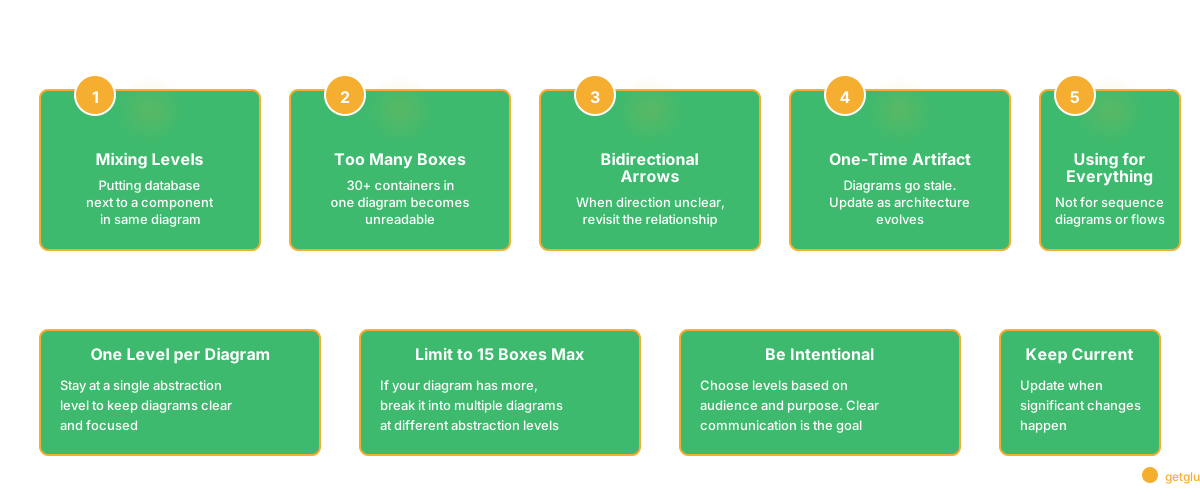
Mixing levels. Putting a database (Level 2) next to a React component (Level 3) in the same diagram. Stay at one level per diagram.
Too many boxes. A container diagram with 30 containers is trying to be a container diagram and component diagrams simultaneously. If you have more than 15 boxes, some detail belongs at a different level.
Bidirectional arrows as shortcut. When direction isn't clear, the instinct is to draw arrows both ways. In most cases, specify the primary direction and protocol. It forces precise thinking.
One-time artifact. C4 diagrams are most useful when kept approximately current. I wrote about this in Software Architecture Documentation — the key is matching documentation approach to the stability of what you're documenting. Context diagrams (Level 1) stay accurate for years. Container diagrams (Level 2) need revisiting when services are added. Component diagrams (Level 3) go stale almost immediately.
FAQ
What is a C4 architecture diagram?
A software architecture visualization using four abstraction levels: Context, Container, Component, and Code. Created by Simon Brown. Gives teams a shared language for communicating architecture at the right level of detail for a given audience.
Container vs Component?
A container is a separately deployable unit — a web app, microservice, database. A component is a logical grouping within a container — related classes implementing a responsibility. Components live inside containers.
C4 vs sequence diagram?
C4 shows static structure (what exists, how it connects). Sequence diagrams show dynamic behavior (the specific order of interactions for a flow). Most architecture docs benefit from both.
Related Reading
- Software Architecture Documentation: The Part That Always Goes Stale
- Dependency Mapping: How to Know What Will Break Before You Break It
- Code Dependencies: The Complete Guide
- Knowledge Management System Software for Engineering Teams
- Design Patterns: When They Help, When They Hurt, and How to Choose
- Observability: Beyond Monitoring
FAQ